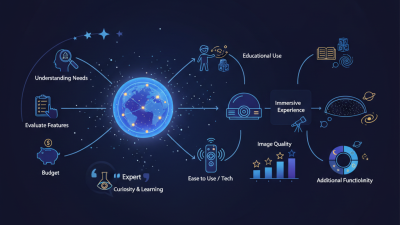
10 Tips for Choosing a Fixed Planetarium?
Choosing a Fixed Planetarium is a long-term decision, not a simple equipment purchase. The dome may look impressive, but performance depends on many connected details. Projection brightness, image resolution, seating comfort, acoustics, ventilation, software, maintenance, and visitor flow all shape the final experience. A beautiful demonstration can hide practical weaknesses.
Thomas Kraupe, former director of Hamburg Planetarium and a respected planetarium specialist, once described the planetarium as “a theater for the universe.” That idea matters. A Fixed Planetarium must present accurate astronomy while creating an emotional connection with every visitor. The stars should feel sharp. The room should feel quiet. The controls should not become a daily burden for staff.
This guide presents 10 practical tips for choosing the right Fixed Planetarium. It considers both technical specifications and real operating conditions. A system may offer extreme resolution, yet deliver disappointing results under poor lighting control. Another may appear less advanced, but provide reliable service and easier content updates.
Budget matters. So does patience.
Buyers should examine supplier experience, warranty terms, upgrade paths, energy use, and local technical support. They should also request a full demonstration with realistic educational content, not only dramatic space scenes. This step is often missed. It should not be.
No choice is perfect. School groups, museums, science centers, and commercial venues have different priorities. Careful comparison helps decision-makers avoid expensive compromises and build a Fixed Planetarium that remains useful, engaging, and dependable for years.
Define the Purpose and Audience of the Fixed Planetarium
10 Tips for Choosing a Fixed Planetarium?
Define the Purpose and Audience of the Fixed Planetarium
A fixed planetarium should begin with a clear purpose, not a dome size. Decide whether it serves schools, families, researchers, tourists, or mixed groups. Each audience needs different seating, language, pacing, and content depth. School groups may require 45-minute curriculum sessions. Families often prefer shorter shows and stronger visual storytelling. Research audiences need accurate datasets, quiet control rooms, and flexible projection tools.
Use attendance goals carefully. The UNESCO Global Education Monitoring Report 2023 warns that education technology works best when access, teaching quality, and context align. A planetarium is no exception. Map local school numbers, transport times, seasonal tourism, and expected repeat visits. Then test the plan with teachers and community groups. My first proposal would probably overestimate weekend demand. That mistake is useful, if discovered early.
Accessibility must shape the room. The WHO Global Report on Health Equity for Persons with Disabilities estimates that 1.3 billion people experience significant disability worldwide. Provide wheelchair spaces with clear sightlines, wide routes, hearing support, captioned content, and adjustable lighting. Consider sensory-sensitive visitors, too. Sound can feel physically overwhelming. Ask users before finalizing specifications. Ten practical checks matter: purpose, audience, curriculum, capacity, access, acoustics, content, staffing, maintenance, and future upgrades. Keep spare capacity. A fully packed schedule can become fragile.
Compare Dome Sizes, Projection Systems, and Image Quality
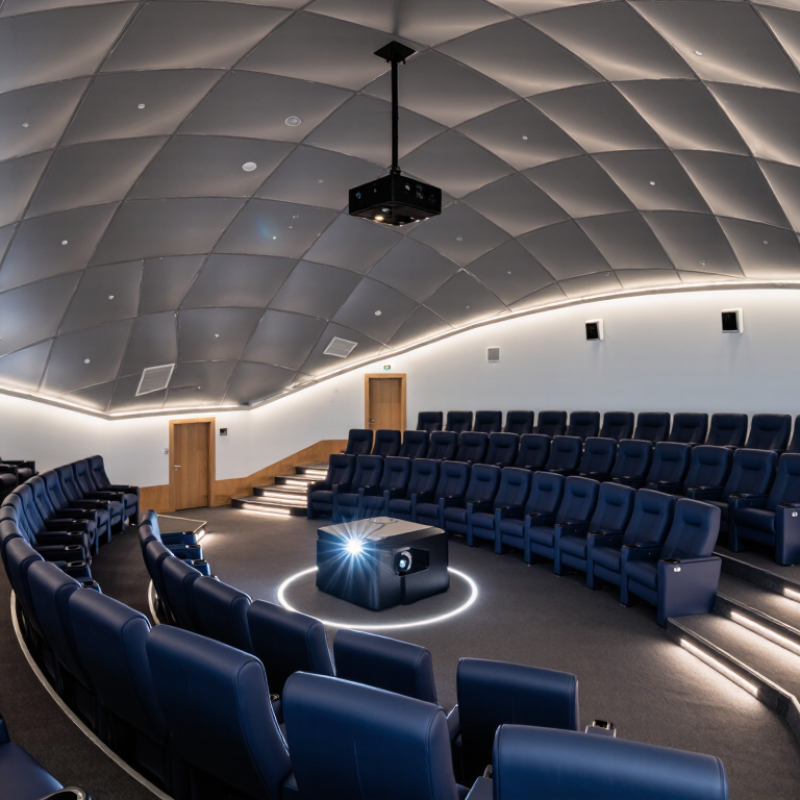
A fixed planetarium should fit its audience, room, and content, not simply look impressive. Tip 1: Measure the dome diameter, height, seating angle, and viewing distance. A large dome can feel immersive, but poor sightlines create blocked horizons. Tip 2: Match the dome size with visitor numbers. A smaller room may deliver stronger detail and easier maintenance.
Tip 3: Compare projection systems by coverage, brightness, contrast, and calibration needs. Single-projector systems may simplify maintenance, while multi-projector systems can improve full-dome coverage. Tip 4: Check edge blending carefully. Visible seams can weaken otherwise accurate astronomy presentations. Tip 5: Ask for live demonstrations using dark skies, bright stars, and moving planets. Static images hide weaknesses. Tip 6: Test the system from the back row. That view often reveals softness first.
Tip 7: Examine native resolution rather than advertised maximum resolution. Tip 8: Look for stable color across the entire dome, especially near the horizon. Tip 9: Request technical records for lamp or light-source life, calibration schedules, cooling, and service access. Reliable documentation matters more than persuasive sales language. Tip 10: Confirm that the system supports your planned educational content and future upgrades. I have seen evaluations focus too much on dome size. That is a mistake. Image quality depends on alignment, surface condition, ambient light, and regular calibration. Even an excellent system can disappoint when maintenance responsibilities remain unclear. (210 words)
10 Tips for Choosing a Fixed Planetarium: Dome Size, Projection Systems, and Image Quality
This reference comparison uses common fixed-planetarium planning profiles. Hemispherical projection area is calculated as 2πr². Aggregate source pixels are based on the stated number of 4K projectors, with one 4K projector providing approximately 8.3 million pixels. Actual effective image quality depends on lens quality, calibration, edge blending, viewing distance, contrast, brightness uniformity, and the pixels lost through warping and overlap.
Evaluate Building Requirements, Installation, and Maintenance
10 Tips for Choosing a Fixed Planetarium?
Tip: Survey the site before selecting equipment. Measure ceiling height, floor loading, door widths, emergency exits, and service access. A large dome may fit drawings but fail during delivery.
Tip: Check acoustics early. Fans, projectors, and audience movement can damage immersion. Request reverberation targets from a qualified acoustician. Test the room with temporary speakers before construction.
Tip: Design climate control around people and sensitive equipment. ASHRAE guidance emphasizes stable temperature, humidity, ventilation, and filtration for occupied technical spaces. Do not place air outlets above the dome.
Tip: Plan cable routes, control rooms, storage, and cleaning areas. These details seem minor. They become expensive after installation.
The 2023 Global Status Report for Buildings and Construction states that buildings consume about 30% of global final energy and create roughly 26% of energy-related emissions. Efficient HVAC, lighting, and standby controls therefore matter. Tip: Compare systems using whole-life energy, not purchase price. Ask for measured operating data from similar facilities.
Tip: Require a commissioning plan. It should cover alignment, sound levels, ventilation, emergency lighting, software backup, and staff training. Tip: Demand maintenance intervals and replacement lead times in writing. Tip: Keep critical spare parts on site. Tip: Provide safe access to projectors and ceiling equipment. Tip: Verify warranty responsibilities before handover. Tip: Schedule annual performance checks.
A practical commissioning lesson is uncomfortable: operators often receive a beautiful room but incomplete procedures. Tip: Include staff during testing. Let them clean lenses, reset controls, and report faults. Tip: Review the design after the first busy season; visitor behavior may expose assumptions that looked reasonable on paper.
Review Educational Features, Accessibility, and User Experience
A fixed planetarium should turn astronomy lessons into clear, memorable experiences. Check whether its educational programs match different age groups and learning levels. Look for accurate star data, adjustable simulations, and explanations that connect space with everyday science. A strong system supports teachers with lesson plans, live controls, and simple content updates. Ask to observe a real session, not only a polished demonstration.
Test accessibility from the entrance onward. Wide routes, stable seating, captions, audio descriptions, and adjustable lighting can make a major difference. Confirm whether wheelchair users can see the main projection without awkward positioning. Hearing assistance should work without distracting background noise. Small details matter. I once overlooked seat spacing during a visit, and the crowded aisle limited movement more than expected.
User experience depends on both technology and people. The interface should be understandable after brief training, even during a busy school day. Examine loading times, control labels, maintenance records, and technical support response times. Ask educators how students behave during longer shows. Do they ask questions, lose focus, or interact with the content? Reliable equipment matters, but staff confidence matters too. Request accessibility testing evidence and safety documentation from qualified professionals. I would also compare several sessions, because one impressive performance can hide inconsistent sound or confusing navigation. A few weaknesses are acceptable when the supplier acknowledges them and offers a practical improvement plan.